

How to Remove Your Name and Address from Google Search
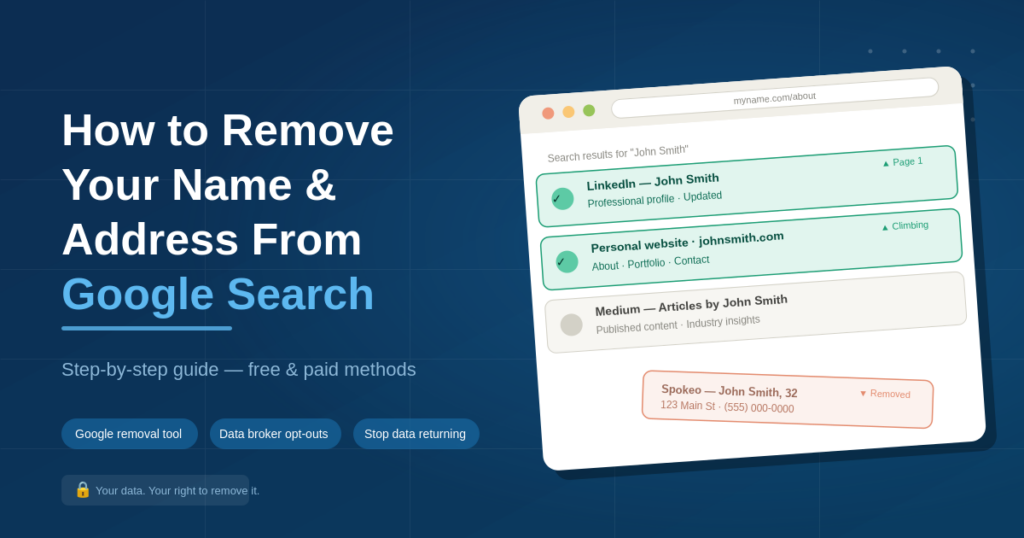
Finding your home address or phone number on Google is unsettling, and it’s fixable. The fastest first step is to use Google’s Personal Information Removal tool, which lets you request that Google stop showing certain personal details in search results. It’s free, takes about five minutes to fill out, and is the most direct route available.
That said, removing your data from Google alone usually isn’t enough. Google indexes pages hosted on data broker sites, and even if Google stops showing a result, the data still lives on the source site, where it can be found directly, re-indexed, or sold to other aggregators.
This guide walks you through all three steps: removing data from Google, opting out of the data broker sites that feed it, and requesting removal from individual websites that refuse to cooperate.
Step 1 — Use Google’s Personal Information Removal Tool
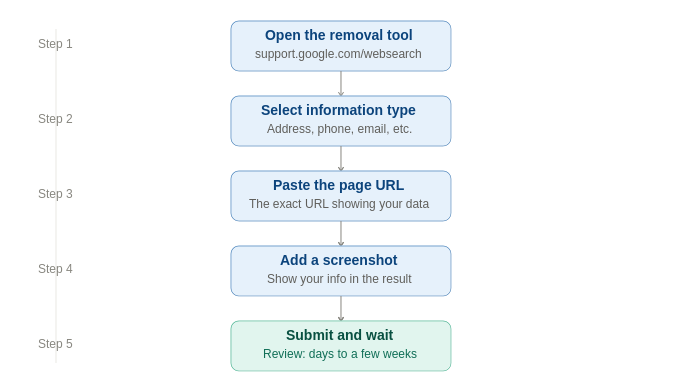
Google offers a direct removal tool for personal information that appears in search results. You can access it at support.google.com/websearch/troubleshooter/9685456.
The tool covers removal requests for the following types of content:
- Your home address, phone number, or email appearing in search results
- Images of your ID, government documents, or financial details
- Intimate or non-consensual personal images
- Content that could enable identity theft or fraud
How to submit the request:
- Go to the removal tool and select ‘I have a personal information issue’
- Choose the type of information you want removed (address, phone, financial info, etc.)
- Paste the exact URL of the page where your information appears
- Add a screenshot of the search result showing your details
- Submit and wait, Google typically reviews requests within a few days to a few weeks
| What Google’s tool does and doesn’t do Google’s removal tool can de-index a result, meaning it stops showing in Google search, but it does not delete the information from the actual website. The page still exists; Google just won’t link to it. If the source site keeps the information live, it may be re-indexed in future. That’s why Step 2 below matters. |
Step 2 — Opt Out of the Data Broker Sites That Feed Google
Most results that show your name and address on Google come from data broker sites, companies that aggregate public records and sell personal profiles. Removing your data from these source sites is the more permanent fix, because it eliminates the information rather than just hiding it from one search engine.
Here are the 10 biggest offenders, with direct links to each site’s opt-out page:
| Site | What they list | Direct opt-out link |
|---|---|---|
| Spokeo | Name, address, phone, relatives | Go to opt-out page → |
| WhitePages | Address, phone, household members | Go to opt-out page → |
| BeenVerified | Background, address, email | Go to opt-out page → |
| Intelius | Criminal records, address history | Go to opt-out page → |
| Radaris | Address, employment, social profiles | Go to opt-out page → |
| TruthFinder | Criminal records, address, contact | Go to opt-out page → |
| Instant Checkmate | Arrest records, address, phone | Go to opt-out page → |
| MyLife | Reputation score, address, background | Go to opt-out page → |
| FamilyTreeNow | Address, relatives, property records | Go to opt-out page → |
| FastPeopleSearch | Phone, address, email | Go to opt-out page → |
Each opt-out process is different. Most require you to:
- Search for your name to find your specific listing
- Complete a verification step (email confirmation, CAPTCHA, or phone verification)
- Wait 24 hours to 30 days for the removal to be processed
- Re-check after 30 days to confirm it’s gone
Want the full list of 150+ data broker sites and their opt-out links? See our Complete Data Broker Opt-Out Guide
Step 3 — Request Removal Directly from Individual Websites
Some sites that publish your personal information aren’t standard data brokers, they’re news sites, public forums, court record databases, local directories, or old social profiles. For these, you’ll need to contact the website directly.
Contact the website owner or webmaster
Most sites have a contact form, email address, or privacy policy that includes a data removal or content request process. Look for:
- A ‘Contact Us’ or ‘Privacy’ page
- A WHOIS lookup at who.is to find registrant contact details if the site hides its contact info
- A DMCA takedown request if your content was published without permission
Invoke your legal rights where applicable
Depending on which US state you’re in, you may have specific legal rights that compel websites to remove your data:
- California (CCPA/CPRA) — right to request deletion of personal information held by businesses that meet the law’s thresholds
- Virginia (VCDPA) — right to delete personal data collected about you
- Colorado, Connecticut, Texas, and others — similar state privacy laws have passed in recent years; check your state’s current law
When a site refuses
If a site ignores your request or refuses to remove your information, your options are:
- File a complaint with your state attorney general’s office (especially effective in states with active privacy laws)
- Submit a formal de-indexing request to Google for the specific URL using the tool from Step 1
- Engage a professional reputation or data removal service to pursue it through established channels
How to Check if Your Information Was Removed
After submitting removal requests, don’t just assume they’ve been processed. Here’s how to verify:
- Search Google for your name in quotes — e.g. “Jane Smith” “123 Main Street”, to see if the result still appears. Use a private/incognito browser window to get unfiltered results.
- Check the source site directly — visit the data broker site and search for your name. If your profile still appears, the removal hasn’t completed yet.
- Use Google Search Console — if you own your own website, Search Console shows you which of your pages are indexed. For personal data on other sites, the removal tool’s status tracker (accessible after submission) shows whether Google has processed your request.
- Set a Google Alert for your name — go to google.com/alerts and create an alert for “Your Name” + your city or zip. You’ll get an email notification if a new result containing your name appears.
Expect the full process, Google de-indexing plus data broker removal, to take anywhere from a few days to 30 days from when you submit each request. Some sites confirm faster; a handful take the full 30 days.
Why Your Information Keeps Reappearing (and How to Stop It)
This is the part most people don’t expect: even after successfully removing their information, it comes back. Here’s exactly why, and what to do about it.
Why it comes back
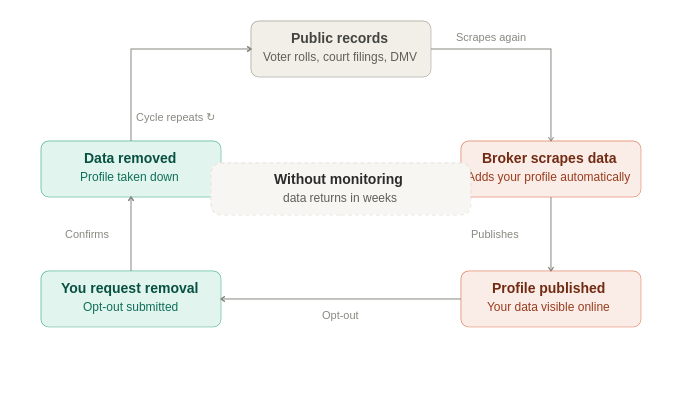
- Data brokers scrape public records continuously. Voter registrations, property records, court filings, and DMV data are refreshed regularly. Even after a successful opt-out, the next time a broker scrapes those sources, your information gets re-added automatically.
- New data broker sites keep launching. There are hundreds of these sites, and new ones appear every year. Opting out of today’s list doesn’t protect you from sites that launch next month.
- Opt-outs expire on some sites. A handful of brokers have opt-out windows that need to be renewed periodically, meaning a one-time submission isn’t permanent even on sites that honour it.
- Google re-indexes when content returns. Once a data broker re-adds your profile, Google’s crawlers will find it again and it will reappear in search results, even if you previously had it de-indexed.
How to stop it
- Repeat opt-out submissions every 3–6 months on the most aggressive data broker sites
- Keep your Google Alert active so new appearances are caught quickly
- Where possible, request removal from the underlying public record sources (some county clerks and state agencies accept suppression requests)
- Consider a professional data removal service that monitors and re-submits automatically, the DIY approach works, but the re-submission burden compounds over time
The Bottom Line
Removing your name and address from Google is a three-part process: use Google’s removal tool to de-index the result, opt out of the data broker sites that are the actual source, and contact individual websites directly for anything that doesn’t fit the first two steps. Done consistently, these steps work, the challenge is that the process never fully ends, because data brokers keep re-adding information as they scrape new public records.
If you want the process handled automatically, initial removals plus continuous monitoring and re-removal, our personal information removal service covers 150+ data broker sites and keeps your data off them on an ongoing basis.
